

Kiiroo Virtual Reality Headset for Smartphones
£36.99
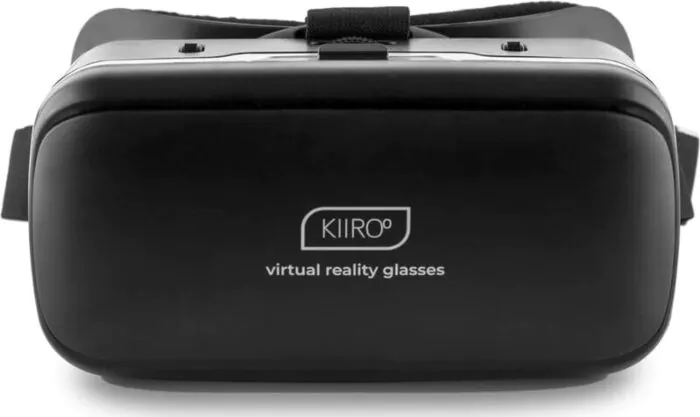

Kiiroo Virtual Reality Headset for Smartphones
Virtual reality headset from Kiiroo that works with your phone. You slide your phone inside and put the headset on. It fits iPhone, Android and Windows phones with a 3.5 to 6 inch screen (up to 15.2 cm), so check the size of yours before you buy.
Orders start at £20 — add more to check out.
Your parcel arrives in a plain box and the sender does not mention Loviux
Kiiroo Virtual Reality Headset Your phone, inside a headset.
It has 42 mm spherical resin lenses and is designed to be used without glasses if you have up to 600 degrees of short-sightedness. Kiiroo presents it for viewing the virtual reality content that its Keon 1 and Keon 2 sync with, all around you. Apart from your phone, you don't need any other device.
- For your phone
- 42 mm lenses
- Short-sightedness up to 600
- ABS

The essentials
Kiiroo Virtual Reality Headset: what you need to know before you buy
Is it for you?
Who the Kiiroo Virtual Reality Headset is for, and who it isn't
It suits you if…
- You want to try virtual reality with the phone you already have.
- You have a Keon 1 or a Keon 2 and want to view the content it syncs with all around you.
- You have up to 600 degrees of short-sightedness and would rather not wear glasses underneath.
- You use an iPhone, an Android or a Windows phone with a 3.5 to 6 inch screen.
Better look elsewhere if…
- Your phone screen is smaller than 3.5 or larger than 6 inches. That is outside the compatible size.
- You have more than 600 degrees of short-sightedness. It is designed to be used without glasses only up to that prescription.
- You want a headset that works on its own. This one needs your phone as the screen.
Step by step
How to use the Kiiroo Virtual Reality Headset
- Check your phone. It has to be an iPhone, Android or Windows phone with a 3.5 to 6 inch screen.
- Put your phone inside the headset.
- Put the headset on.
- If you wear glasses, try it without them. The headset is designed to be used without glasses with up to 600 degrees of short-sightedness.
Cleaning
Clean the casing with a soft, dry cloth. For the lenses, follow what the quick start guide in the box says.
Our tips
- Read the quick start guide before you use it for the first time.
- Use it sitting down or in a clear space. You can't see what's around you while you wear it.
- If you feel dizzy, your eyes get tired or you get a headache, take it off and rest.
In the box
What's in the box
- Kiiroo Virtual Reality Headset
- Quick start guide

Specifications
Kiiroo Virtual Reality Headset: technical specifications
- Type
- VR headset for phones
- Phone screen
- 3.5 to 6 inches (up to 15.2 cm (6 in))
- Compatible phones
- iPhone, Android and Windows
- Lenses
- Spherical resin, 42 mm
- Compatible short-sightedness
- Up to 600 degrees
- Material
- ABS
- Includes
- Quick start guide
- Brand
- Kiiroo
- Model
- Virtual Reality Headset
- EAN
- 8720938956201
Questions
Kiiroo Virtual Reality Headset: frequently asked questions
Which phones fit the Kiiroo Virtual Reality Headset?
iPhone, Android and Windows phones with a 3.5 to 6 inch screen (up to 15.2 cm (6 in)). If your phone screen is outside that range, it isn't compatible.
Can you use the Kiiroo Virtual Reality Headset without glasses?
Yes, if you have up to 600 degrees of short-sightedness. The manufacturer designed it to be used comfortably without glasses within that prescription.
How do you use the Kiiroo Virtual Reality Headset?
You put your phone inside the headset and put the headset on. Apart from your phone, you don't need any other device.
Does the Kiiroo Virtual Reality Headset work with the Keon?
Yes. Kiiroo presents it for viewing, all around you, the virtual reality content that your Keon 1 or Keon 2 syncs with.
What is the Kiiroo Virtual Reality Headset made of?
ABS plastic, with 42 mm spherical resin lenses.
What's in the box with the Kiiroo Virtual Reality Headset?
The headset and a quick start guide. You supply the phone.
Before publishing this product sheet we check that every figure is in its sources and that what it says holds up. Product sheets that do not pass this check are not published. How we verify information ›
Product sheet updated on 11 October 2026
Questions & Answers
Ask a Question About This Product
Missing a detail?
Ask us and we will answer you by email.
Reviews
How our reviews work
- We ask customers who bought the product for their opinion once they have received their order.
- Anyone can also leave a review with the form. Every review is checked by hand before it is published, and we do not remove a review for being negative.
- Customer photos are checked one by one before they are published.
- Some reviews were written in another of our stores and are shown machine-translated.
Related Products


